Runtime Ownership Made Simple with TanStack Router
You have a web app owned by multiple teams. Something breaks in production. Which team should get paged? A user clicks a button, whose analytics dashboard should light up? These questions might seem simple, but when you’re dealing with shared layouts and 250+ routes, runtime ownership becomes a real challenge.
We cut 245 ownership providers down to 3. Here’s how TanStack Router made that possible. But first, what is runtime ownership?
What is runtime ownership
Runtime ownership is all about routing the right information to the right team. We’re talking about:
- Monitoring alerts
- Runtime errors
- Application logs
- Analytics events
You want to tag each of these to the appropriate team automatically. And this gets particularly tricky in a web app where multiple teams share layouts and pages. How do you know which team owns what when everything’s interconnected?
Our first attempt with providers
Like many teams, we started with the obvious solution: React context. You slap a provider around your component that says “this is my team” and call it a day. Simple enough, right?
But this approach had serious limitations. It was opt-in, which meant people forgot to use it. Or they didn’t know when to use it properly. Basically, it was too easy to get wrong. And when something’s easy to get wrong, it will get wrong.
There must be another way… We recently started using TanStack Router for our main App (article coming soon), maybe there is something we can leverage from the new router?
Enter TanStack Router
We turned our attention to TanStack Router because it has this API called staticData. Static props are attributes you can define on a route that are completely type-safe, and here’s the key part: you can access them at runtime!
Ok, but how do you set them up? You have to extend the StaticDataRouteOption type with your own custom properties. They can be required or optional. Let’s add a team property to our routes:
// Register the router instance for type safetydeclare module '@tanstack/react-router' {  interface Register {    // Your existing router register    router: typeof router  }
  // This is the new part!  interface StaticDataRouteOption {    team: 'dashboard' | 'expenses' | 'time-off' | 'auth' // ...  }}
So what can we put in there? Well, we can say every route is owned by a team:
import { createFileRoute } from '@tanstack/react-router'
export const Route = createFileRoute('/login/account')({  staticData: {    // This route is owned by the auth team    team: 'auth',  },})
And because this is all backed by TypeScript, when a team is missing or doesn’t match an allowed value, we get a compile-time error!
The beauty of this API is that when you get a match on TanStack Router, you get the match content and the route data, including the static data. That means we now have a way to define ownership at the route level and access it when we need it!
Let’s see how this works in practice
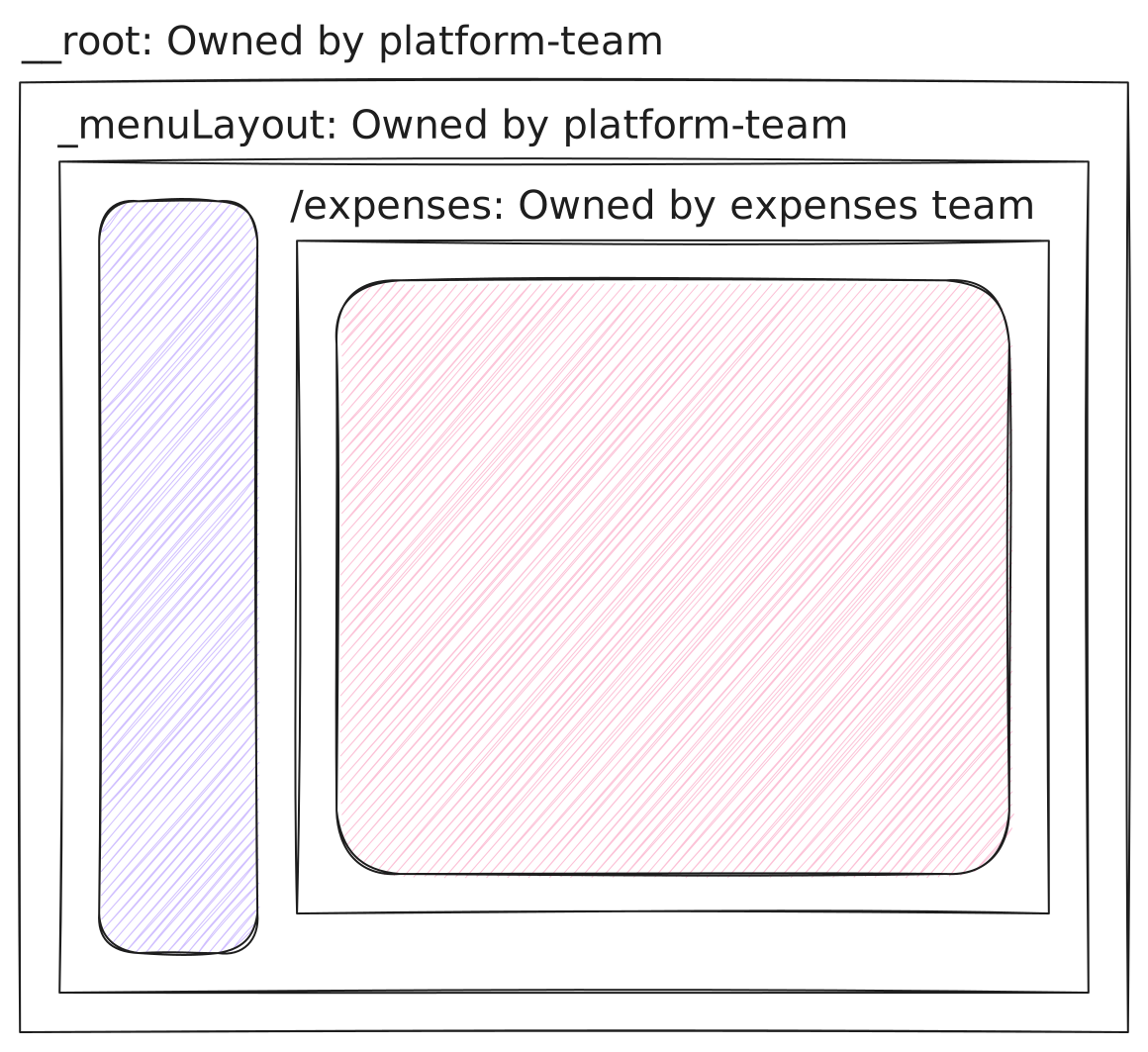
Let’s say you have a app with 3 routes:
- the
__rootroute, owned by theplatform-team - the
_menuLayoutroute, owned by theplatform-team - and finally, the
_menuLayout/expensesroute, owned by theexpensesteam
Each of these routes has a team assigned to it, and we can visualize it like this:
To know which team owns a route, all we have to do is to get the route match, and we can build a small hook to do so:
import { useMatch } from '@tanstack/react-router'
export function useCurrentOwner() {  // Get the current route match segment  return useMatch({    // match any possible route    strict: false,    // and only return the team name, in a type-safe way too!    select: match => match.staticData.team  })}
And, given the useMatch hook, without strict route id matching, will match the closest route a component is mounted on, we will have the data on the segment level!
Now, we can use it within our shared hooks like so:
import { useCurrentOwner } from './useCurrentOwner'
// and same with other places we need the ownerexport function useMonitoring() {  const owner = useCurrentOwner()  return {    addError: (error) => {      window.datadog.error(error, { team: owner })    },    // more functions  }}
And with that, events, errors and logs are routed to the right team!
The shared layout problem
But what about shared layouts? This was one of our biggest challenges.
Turns out this works out of the box. A layout is owned by one team, and the routes underneath might be owned by another team. When you use match on the layout, you get only the match of the layout, meaning you get the owner of the layout. And if you use match on the children (like a specific dashboard route), you get the owner of that dashboard directly!
This solved most of our issues automatically. No extra configuration is needed.
Handling the edge cases
It’s not perfect, though. In some cases, we don’t necessarily have matches for every component. For example, a payroll widget inside a dashboard might be owned by a completely different team than the dashboard itself.
To handle this, we added another layer to our solution. We kept the context provider approach, but now it’s opt-in only where it actually makes sense. We went from 245 of those providers scattered throughout our codebase to just three. Only in the specific areas where we need to enforce different team ownership.
Here is a rough example of what that looks like, a simple react provider:
import { createContext, useContext, type PropsWithChildren } from 'react'import { useMatch } from '@tanstack/react-router'
type Team = 'dashboard' | 'expenses' | 'time-off' | 'auth' | 'payroll' // ...
// Context for component-level overridesconst OwnershipContext = createContext<Team | null>(null)
// Provider for edge cases where component ownership differs from routeexport function OwnershipProvider({ team, children }: PropsWithChildren<{ team: Team }>) {  return (    <OwnershipContext.Provider value={team}>      {children}    </OwnershipContext.Provider>  )}
// Hook that checks provider first, then falls back to route ownershipexport function useCurrentOwner(): Team {  const overrideTeam = useContext(OwnershipContext)
  const routeTeam = useMatch({    strict: false,    select: (match) => match.staticData.team,  })
  // Provider override takes precedence  return overrideTeam ?? routeTeam}
And now, on our dashboards, we can route sub part of the page to a different team:
// Inside a dashboard route owned by 'dashboard' teamfunction DashboardPage() {  return (    <div>      <h1>Dashboard</h1>
      {/* This widget is owned by payroll team, not dashboard */}      <OwnershipProvider team="payroll">        <PayrollWidget />      </OwnershipProvider>    </div>  )}
function PayrollWidget() {  const team = useCurrentOwner() // Returns 'payroll'
  // Errors and analytics from this component  // now route to the payroll team  return <div>...</div>}
Dashboards are now solved! There is still some very edge cases were we want to force the ownership of a event, logs and error to a specific team. We can do that locally by forcing the team name to our internal functions. This allows us to keep ownership even when a function is reused across multiple teams, but owned by one.
import { useCurrentOwner } from './useCurrentOwner'
// and same with other places we need the ownerexport function useMonitoring(team?: Team) { const owner = useCurrentOwner() return { addError: (error) => { window.datadog.error(error, { team: team ?? owner }) }, // more functions }}The three-layer approach
Our final solution uses three layers:
- Route-level ownership via TanStack Router’s
staticData(the default, works automatically for layouts too) - Component-level overrides using context providers (for embedded widgets)
- Function-level overrides via optional parameters (for shared utilities)
This makes runtime ownership transparent and automatic for most of the codebase. And for engineers? They don’t even need to think about it most of the time. And when they do, it’s because TypeScript told them so!
The results
The beauty of TanStack Router’s static data types allowed us to build this very affordably. We removed most of the ownership-specific code from our codebase, and everything just worked.
Remember, we have more than 250 routes in our application. Before this solution, it was very challenging to maintain ownership information. We even discovered that some routes didn’t have actual ownership assigned because it wasn’t enforced. The type-first approach of TanStack Router caught these issues at compile time.
That’s the brilliance of a type-first router. You get compile-time guarantees about runtime behavior. Your IDE tells you when you’ve forgotten to assign ownership. Your build fails if a route doesn’t have a team. No more guessing, no more runtime surprises.
So if you’re dealing with a multi-team application and struggling with runtime ownership, consider leveraging your router’s type system. It might just be the architectural decision that makes everything else fall into place ☀️